Page Contents
In data mismatch cases the only solution is to have it rectified. For instance, if your name’s spelling in Aadhaar is wrong then get it corrected from UIDAI. If there is an error in the PAN card, get it corrected either from UTI or NSDL — the two agencies responsible for issuing PAN cards. Whenever the correction is done, you will make a successful attempt to complete the link again, this time.
An individual can link the PAN card and Aadhaar card through three ways:
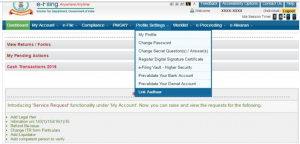
Process-1: Visit the I-T Dept e-filing website. And find out that option of PAN-Aadhaar linking
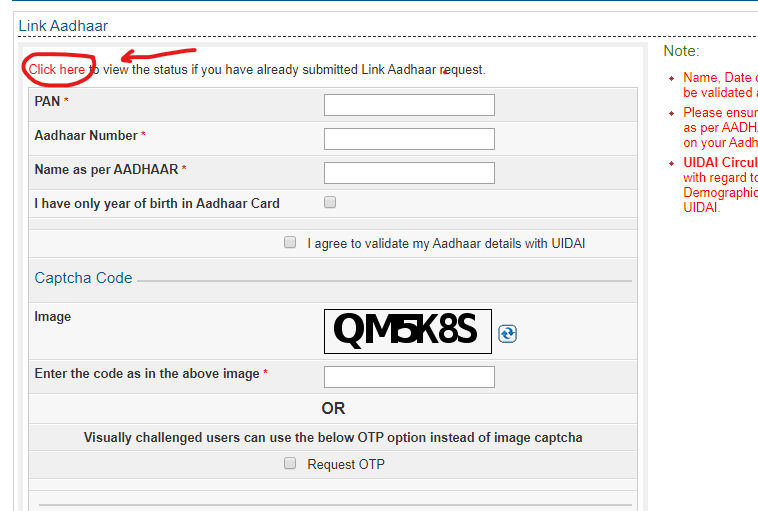
Process-2: File up your PAN & Aadhaar card number
Process-3: Enter your name in the ‘Name as per AADHAAR’ mention as a category
Process-4: Mark ‘I have the only year of birth in Aadhaar card,’ if you have only the birth year on the Aadhaar
Process-5: Mark ‘I agree to validate my Aadhar details with UIDAI,’ if you agree to do so
Process-6: Enter the captcha code on your screen.
Process-7: Click on the ‘Link Aadhaar’ option to request linking of PAN and Aadhaar
An individual can also link Aadhaar with PAN by sending SMS. The steps are as follow:
Process1. Type a message in UIDPAN<12 Digit Aadhaar><10 Digit PAN > format.
Process2. Send any message from your registered mobile number to either 567678 or 56161.
Process3. If the information is right the Aadhaar will be successfully connected to PAN.
Individuals are also given the option to manually connect the Aadhaar to the PAN. The person will be required to visit the NSDL PAN Service Provider, complete the necessary form, and provide the relevant documents to connect Aadhaar to the PAN card.
www.carajput.com; Link Aadhar and PAN An individual can check whether or not his or her Aadhaar is connected to PAN. Following are the steps to check:
Process1. Continue to visit the official https:/www.incometaxindiaefiling.gov.in / home website.
Process2. Click the ‘Aadhaar’ sub-option Link below the Quick Links option.
Process3. Continue. A new screen will pop up, clicking on ‘click here to view the status if you have already submitted a request for the Aadhaar link.’
Process4. Enter the details and click ‘Aadhaar Status View Link.’
The website will show the status of whether the Aadhaar is linked or not.
GST on Charitable and Religious Trusts: Exemptions, Rulings and Compliance Explained Do charitable trusts pay GST? The short answer Yes.… Read More
GST Multi-State Registration Made Simer: One Master TRN for Multiple States Expanding a business into new States has always come… Read More
New TDS Framework for Purchase of Property from NRIs Effective 1 October 2026 Income Tax Notification: The CBDT has notified… Read More
Statutory Tax Compliance Calendar – October 2026 October 2026 is one of the busiest compliance months of the year. Businesses… Read More
Unpaid Audit Fees and Auditor Independence: What the ICAI Code of Ethics Really Says No, an auditor is not barred… Read More
Moving to the UAE: What Actually Decides Your Indian Tax Residence Documents show where you live, not your tax status… Read More